Every event, every moment remembered

A flexible solution for sharing and storing photos and videos

Create event
(Free)

Step 1

Tutorial step 1 illustration

Create event

Step 2

Tutorial step 2 illustration

Share a QR code or link

Step 3

Tutorial step 3 illustration

Guests upload photos, videos, or messages

Step 4

Tutorial step 4 illustration

Display live slideshows and save your event album

Step 1

Tutorial step 1 illustration

Create event

Step 2

Tutorial step 2 illustration

Share a QR code or link

Step 3

Tutorial step 3 illustration

Guests upload photos, videos, or messages

Step 4

Tutorial step 4 illustration

Display live slideshows and save your event album

From sharing to storage - all in one place

message illustration

No matter the event, photos and videos are easy to share.

Everyone joins in the simplest way

         And every moment is neatly stored in a shared album.        

messsage illustration 2

Shared together, the moments feel whole.

section devider

With just a QR code, attendees can easily share photos and videos.

No app. No registration. Just scan and start sharing instantly.

Image icon illustration

Collect photos & videos from attendees

Each person contributes their own perspective. The event album becomes more complete and authentic.

Phone icon illustration

Live slideshow

New uploads show up in real time, fitting a variety of spaces and uses.

message icon illustration

Capture, share, and keep the moments

Every shared moment is captured as it happens and stored in one shared album.

Manage icon illustration

Privacy & control

Only people with the link or QR code can join. You stay in full control of the content.

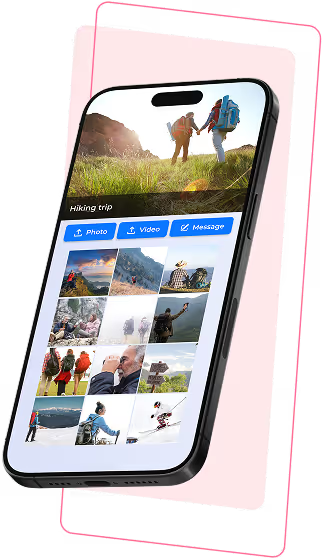
Knipsly other event album interface
Image icon illustration

Collect photos & videos from attendees

Each person contributes their own perspective. The event album becomes more complete and authentic.

Phone icon illustration

Live slideshow

New uploads show up in real time, fitting a variety of spaces and uses.

message icon illustration

Capture, share, and keep the moments

Every shared moment is captured as it happens and stored in one shared album.

Manage icon illustration

Privacy & control

Only people with the link or QR code can join. You stay in full control of the content.

section devider

Frequently Asked Questions

How the event album works

Do attendees need to install an app?

No. Attendees simply scan the QR code or open the event link to participate.

Do attendess need to create an account?

No. Attendees can upload content immediately after opening the link. Only the event organizer needs an account to manage the album.

Where should I place the QR code at the event?

You can place the QR code in visible spots like the reception table, photo area, or display it on screens during the event.

Is the event album private?

Yes. Only attendees with the event link or QR code can access and share content.

Can I control the content in the album?

Yes. You can preview, approve, or hide guest uploads before they appear in the album or slideshow.

Can I download and share the album after the event?

Yes. You can download all photos and videos and share the digital album with attendees after the event ends.

Question mark icon

Do attendees need to install an app?

No. Attendees simply scan the QR code or open the event link to participate.

Question mark icon

Do attendess need to create an account?

No. Attendees can upload content immediately after opening the link. Only the event organizer needs an account to manage the album.

Question mark icon

Where should I place the QR code at the event?

You can place the QR code in visible spots like the reception table, photo area, or display it on screens during the event.

Question mark icon

Is the event album private?

Yes. Only attendees with the event link or QR code can access and share content.

Question mark icon

Can I control the content in the album?

Yes. You can preview, approve, or hide guest uploads before they appear in the album or slideshow.

Question mark icon

Can I download and share the album after the event?

Yes. You can download all photos and videos and share the digital album with attendees after the event ends.

section devider

TABLE OF CONTENTS

CONTACT

support@knipsly.com

Some illustrations on this site are designed by Freepik